
One API Away
Field notes from building a Workday + Slack + Claude integration, and what it revealed about where enterprise HR is actually headed.

I’ve been running a personal sandbox experiment for the past few days that I need to write up properly, because the implications keep compounding.
The starting point was Claude Cowork’s HR plugin. I am just naturally curious about how everything works in general, and needed to dive deep. The destination was something I didn’t expect: a genuinely governed agentic layer sitting between natural language intent and Workday execution. With a Slack connector in the middle (if you want it). With a confirmation gate before anything writes. With an audit trail after.
Let me walk through how I got there, what I actually built, and what it means. The technical story and the strategic story are inseparable here.

What I said publicly, and what I meant
A few days ago I posted something on LinkedIn that I want to use as a starting point, because it was honest in the way that field notes are honest, before you’ve had time to synthesize:
“The Claude Cowork for HR is pretty amazing. Testing in a personal sandbox and the results are promising. Let me be upfront: this is not plug and play.”
I meant every word of that caveat. Workday admin setup alone involves creating an Integration System User, a Security Group, scoping the right security domains, registering an API client, and configuring OAuth. That’s before you’ve written a single line of configuration. Snowflake has its own setup. There are real decisions about what you give the agent write access to versus read-only, and those are not decisions you want to make casually.
Then I posted a second note, after building a full Cowork guide for Workday:
“Tedious EIB loads, as a human workflow, could end. Not immediately. Not for everything. But the trajectory is clear.”
Both of those things are still true. What I want to do now is connect them, because the gap between “this is promising” and “this changes the execution layer of enterprise HR” runs through a specific set of architectural decisions that are worth making explicit.
The question that reframed everything
Here’s the moment in the build process where my thinking shifted.
I had just finished documenting the end-to-end workflow: exec writes ten employee names in a Slack channel, Claude reads the channel, extracts the names, resolves them to Workday WIDs, confirms a bulk location change plan, and executes the Edit Work Location business process. Clean. Auditable. The kind of thing that currently takes an HR coordinator thirty minutes of tab switching.
And then I asked myself: do I have to write the full workflow for every use case? There could be millions.
The answer is no. But understanding why changes how you think about what’s actually being built.

Platform, not workflow
The mistake most people make when they see an AI-powered HR workflow is to treat it as a point solution. You build the location change workflow. Now you need a title change workflow. Then a leave of absence workflow. Then a termination workflow. If you’re thinking in workflows, you’re looking at a combinatorial explosion.
The shift happens when you stop building workflows and start building a platform.
The heavy lifting, the ISU, OAuth, the MCP server, the Slack connector wiring, the confirmation gate pattern, you do once. That’s your infrastructure layer. It doesn’t care what business process you’re executing. It handles authentication, name resolution, confirmation, execution, and audit trail regardless of what action is being taken.
Skills files are where generalization lives. Skills are plain markdown files that tell Claude what to do when it encounters certain kinds of requests. Instead of hardcoding “move 10 people to Palo Alto,” a skill says: when asked to perform any workforce change based on a message or document, extract the affected employees, identify the action type, resolve names to WIDs, confirm the plan, and execute. You write the workflow once.
Slash commands are your use case library. /slack-to-workday, /location-change, /initiate-leave. Named entry points into the same underlying machinery. Adding a new use case means adding a slash command and maybe a new skill file. Not rebuilding anything.
The only time you genuinely add code is when you hit a new Workday API endpoint. And even then, each new tool is roughly twenty lines following a pattern so established it’s fill in the blank.
The API surface is finite and knowable
Here’s something most people haven’t internalized yet about agentic AI and enterprise systems: the meaningful write operations in any mature HRIS are not infinite. They’re a known, enumerable set.
For Workday’s HR surface, that set looks like this: location change, title change, manager change, compensation change, leave initiation, return from leave, transfer, termination, new hire. Maybe thirteen operations when you include helper lookups and inbox task approvals.
I built all thirteen in one session.
Here’s the complete tool inventory from the guide:
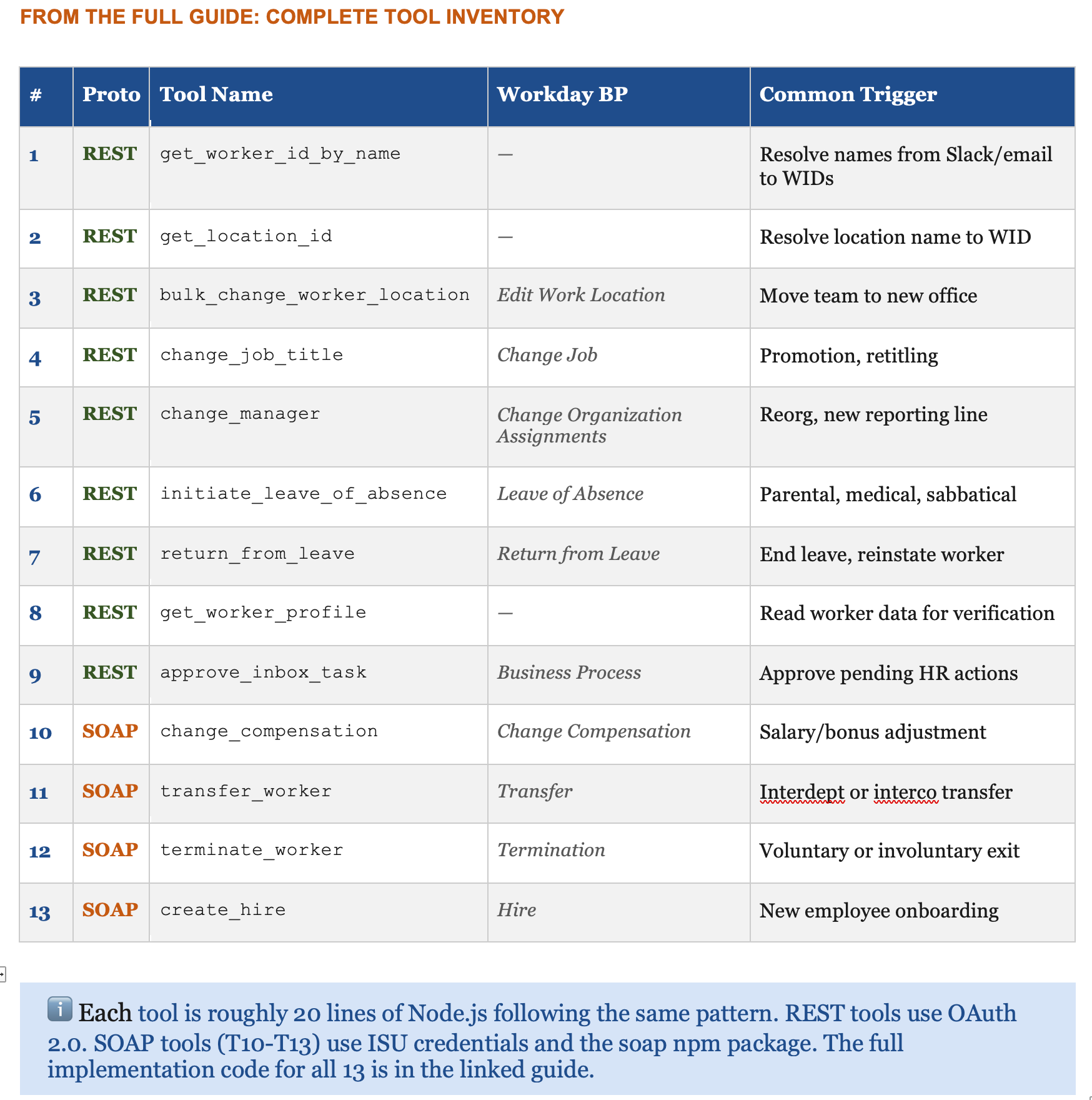
The thin layer of copy paste that remains today exists because someone still has to tell Claude which endpoint to call for a specific operation. But that gap is closing. Workday has an OpenAPI spec. Claude can read an OpenAPI spec. The logical conclusion, already technically achievable if not yet turnkey, is that you point Claude at the spec, tell it which functional domain to cover, and it generates the entire tool set.
We are close to a world where the integration layer writes itself.
This is what I had in mind when I wrote about being one API away from collapsing the latency that makes up most of enterprise HR work. The API was always there. Workday exposed it to enable integrations. What changed is the layer above it: an agent that can interpret intent, resolve ambiguity, construct the right payload, and handle errors in plain English.
The cognitive work that used to live in EIB workflows, the human judgment required to prep, validate, and remediate, is what the agent absorbs. Strong Workday architects become more valuable, not less. Their work is now the infrastructure the agent depends on.

What a tool actually looks like
To make this concrete: here’s a partial view of the change_job_title tool, one of the simpler REST implementations. This gives you the pattern. The full code for all 13 tools, including the SOAP envelope construction for compensation changes, transfers, terminations, and hires, is in the guide.
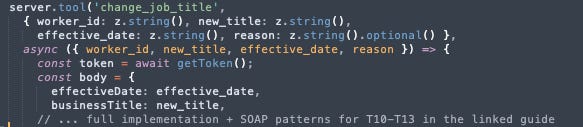
Every REST tool follows this exact shape. The SOAP tools for compensation, transfer, termination, and hire are longer, because the Workday XML envelope is deeply nested, but the MCP wrapper pattern is identical.
One seam worth naming: who pulls the trigger
Let me be precise about something, because the most experienced people in the room will ask it.
The scenario I described — head of HR writes ten names in Slack, Workday updates — sounds fully autonomous. It isn’t. Not yet. Claude does not sit passively watching Slack channels and act on what it reads. It has no ambient awareness. It doesn’t fire unprompted.
What actually happens today is this: the HR head writes in Slack. You see it. You go to Cowork, open a task, and say something like: read the #hr-leadership channel and execute the location change request. Claude reads Slack, extracts names, resolves WIDs, confirms, and executes. But you initiated it. The current flow has a human in the middle as the trigger.

What closes this gap — and how close it already is
The good news: the technical lift to close this is small. The architecture already supports it. There are two paths, both buildable today without waiting for Anthropic to ship anything.
Scheduled tasks. Cowork already supports these natively. You design a task once: check #hr-leadership every morning for unprocessed location change requests and execute them. Claude runs it on schedule. Not event-driven, but for most HR operational workflows, a morning sweep is entirely sufficient. This requires zero custom development. It’s a Cowork configuration.
A Slack webhook trigger. The fully autonomous version: message appears, Workday updates, no human touches; it needs an event-driven layer. Concretely: a Slack workflow that fires when a message from a specific person appears in a specific channel, calls a webhook, and that webhook kicks off the Cowork task. This is a Zapier workflow or a lightweight serverless function. Maybe a day of work for someone who’s done it before. It’s not a project. It’s a feature (though honestly, its probably a few months of headache ;) ).

The reason this gap exists isn’t architectural : it’s that Cowork is still a research preview. Native event-driven triggers, where Claude listens for conditions across connected systems and fires autonomously, is the obvious next feature. The bones are all there. It’s a product decision, not an engineering constraint.
Naming this gap is not a caveat about what I built. It’s a precise description of where the product boundary currently sits: and what it would take to push it forward.
The exclusion list matters as much as the tool list
When I finished the thirteen-tool guide, I added something I think is as important as the tools themselves: an explicit list of what I deliberately left out.
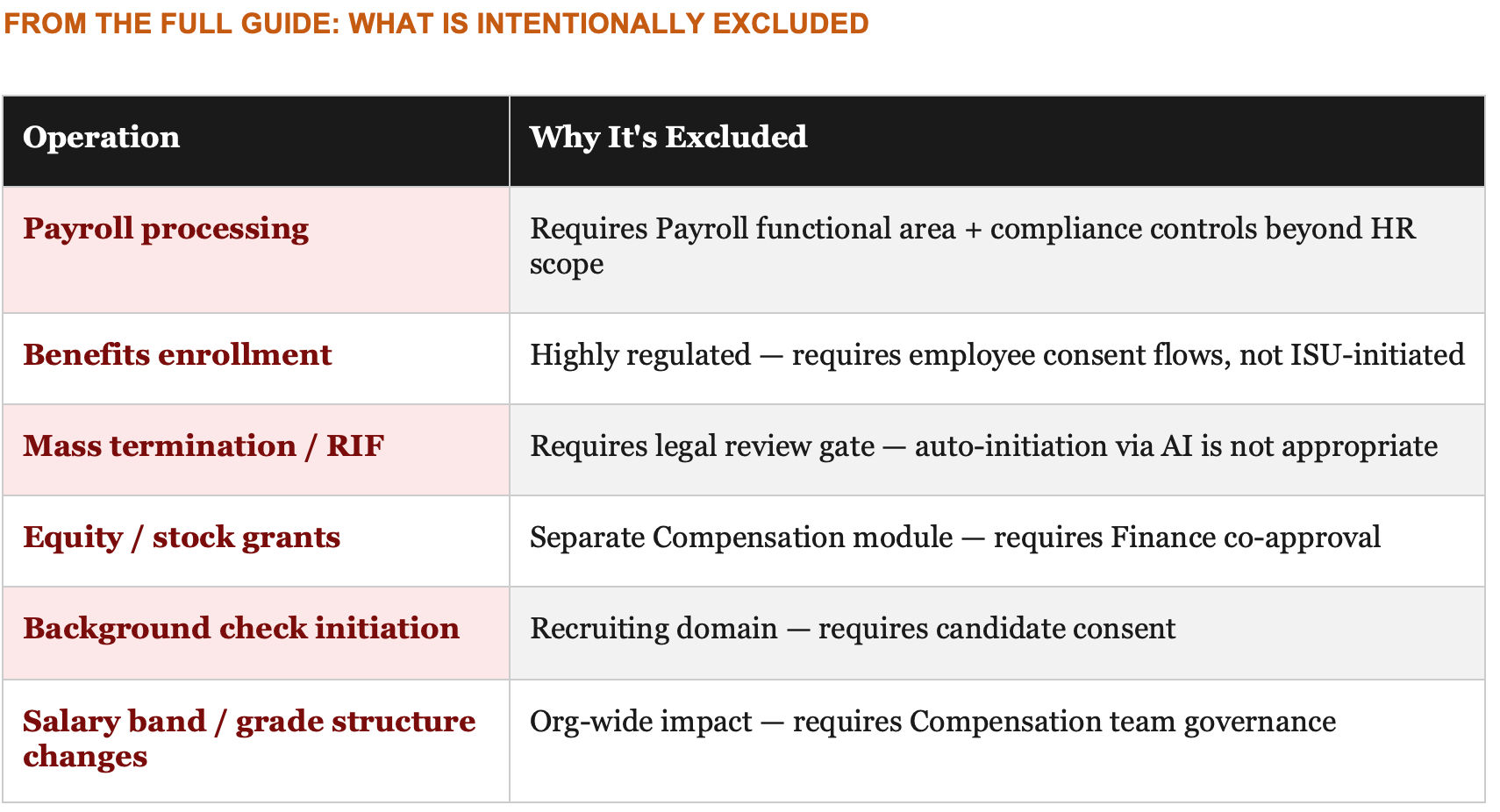
The exclusion list is a governance artifact masquerading as a technical one.
When you’re building this kind of system in an enterprise context, the question that will determine whether it goes live in production isn’t “can we build it?” It’s “what shouldn’t we build, and why, and who decides?” That’s an HR and legal and compliance conversation. The engineers can implement whatever you hand them.
I’d argue the exclusion list deserves its own document, its own review process, and its own stakeholder sign-off, separate from the technical build. Because the act of being explicit about what an AI agent cannot initiate is itself a governance control. You are writing down, in plain language, the decisions that require a human being.
The ISU permission table is also a governance document
The integration system user is the non-human account your MCP server authenticates as when it talks to Workday. Configuring it requires going through Domain Security Policies and granting specific permissions across 19 domains for the full thirteen-tool server.
That permission table is not just a technical setup checklist. It is a precise statement of what the AI agent is authorized to do in your system of record. Every row is a capability grant. Every row is an audit surface. Every row should have been reviewed by someone who isn’t the engineer who wrote the MCP server.
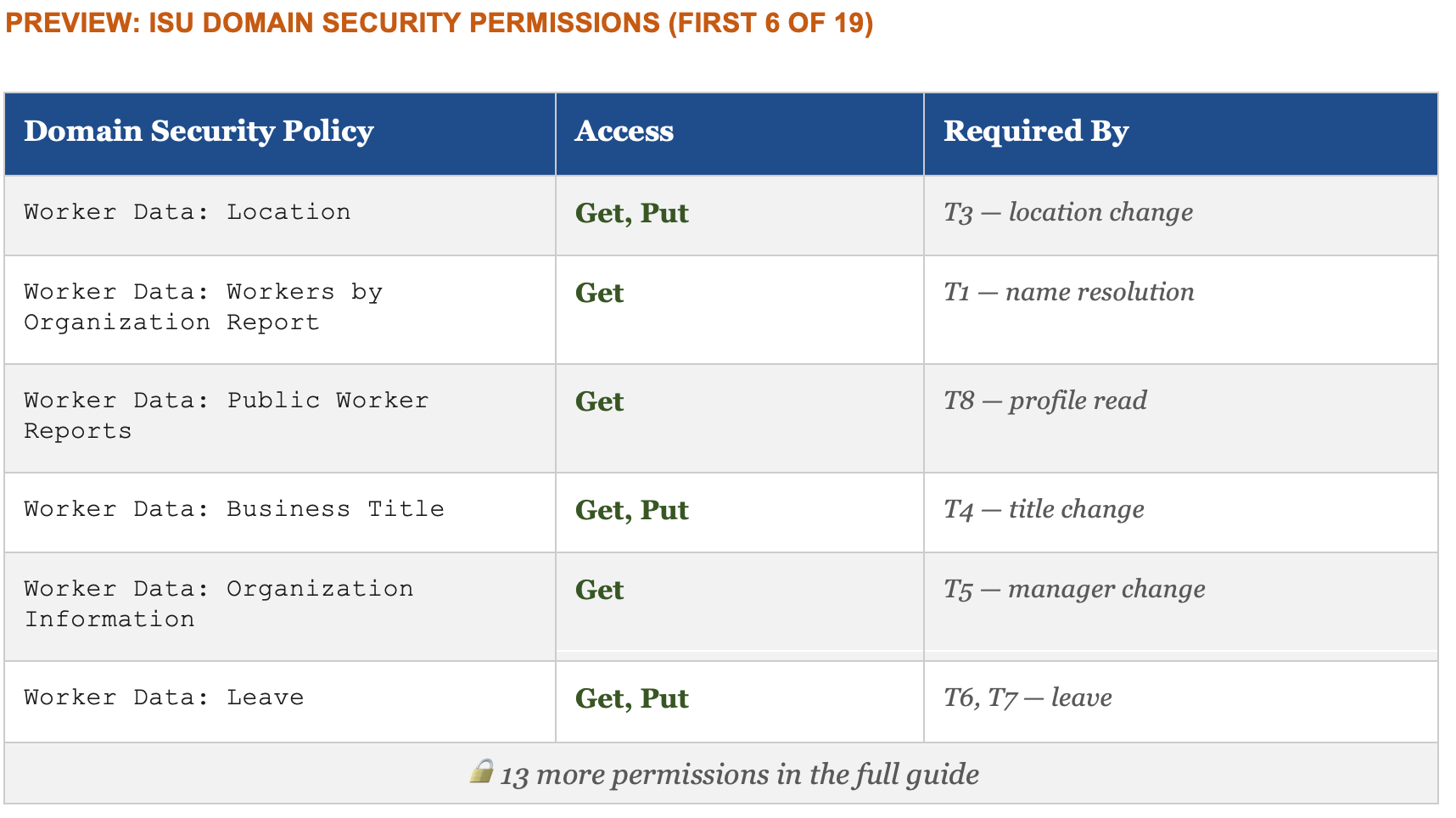
In a well-governed implementation, that table goes to your Workday Security Administrator and your HR Compliance lead before a single permission is activated in production. Not because the permissions are dangerous in isolation, they’re the same permissions a human HRBP has, but because granting them to a service account that operates autonomously at scale is a categorically different risk profile than granting them to a person who logs in, thinks, and clicks.
The permission table is where technical implementation and enterprise risk management intersect. It deserves the same rigor as a SOC 2 control.
The honest caveat, still
I said this in my second LinkedIn post and I’ll say it again here, because it matters:
Cowork is a research preview. There is no enterprise deployment path for it at a Fortune 500 today. No central IT rollout, no SOC 2 for HR data, no tenant-level admin controls. The capability is real. The enterprise readiness is not there. Yet.
What this sandbox work actually is, what these three technical guides actually are, is a blueprint for what the next version of this needs to become.
And that gap between what is technically possible today and what is enterprise deployable tomorrow is exactly where the most interesting work is happening. Not in the models. Not in the plugins. In the governance design, the permission architecture, the exclusion lists, the confirmation gates, and the audit trails that make it possible for a CHRO to say yes.
That’s the work.

What this actually is
Step back and look at what the build produced.
An executive writes three sentences in Slack. A structured, auditable, reversible business process executes in Workday, with a human confirmation gate in the middle, a complete audit trail at the end, and an explicit list of things it is not allowed to initiate.
The platform builds once. Skills generalize across use cases. Slash commands multiply the library without adding complexity. The API surface is finite and increasingly self-documenting. The exclusion list and the permission table are your governance artifacts. This isn't just about HR, it can be about any business flow.
None of this required a dev team or a multi-year implementation (though it would be foolish to think the last bits are easy). It required understanding which problems were technical and which were human, and being honest about which category your hardest questions fall into.

The hardest questions are almost never technical.
The HRBP doesn’t navigate the network anymore. The agent collapses it. What the HRBP does instead is design the boundaries of what the agent is allowed to collapse. That’s a more valuable job. It just requires a different kind of expertise than most people analytics, systems, ops teams have been building toward.
Part II:

This was so well explained, and I am floored by how close we are to things people have been asking decades for. Loved how you identified the exact place where human judgement and governance is most needed. -Austin