The Blueprint
Steps for an implementation: Workday, Slack, and Claude (or any agentic layer).


My wife asked me what I was doing on Sunday morning. I told her I was talking to an AI that was talking to another software system, then another on my behalf. She looked at me for a second, said “of course you are,” and went back to sunny patio with her morning coffee.
She has heard enough of these weekends to know better than to ask follow up questions. But right now, in 2026, what I built is turning into the new normal. Most enterprise software does not talk to anything unless a human is in the middle of it clicking buttons. I spent sometime changing that for one system, not for any other reason than to understand the truths behind all the conversations from AI visionaries to economist to the IC to everyone in between.
This is not a thought piece. It is a blueprint. If you are an engineer, an architect, or someone who just wants to understand what is actually possible right now with Claude, Workday, and Slack, this is written for you. I am going to show you some of the pieces and how it works, where it breaks, and what you need to know before your team starts building.
Part 1 — Workday: Create Your Integration System User
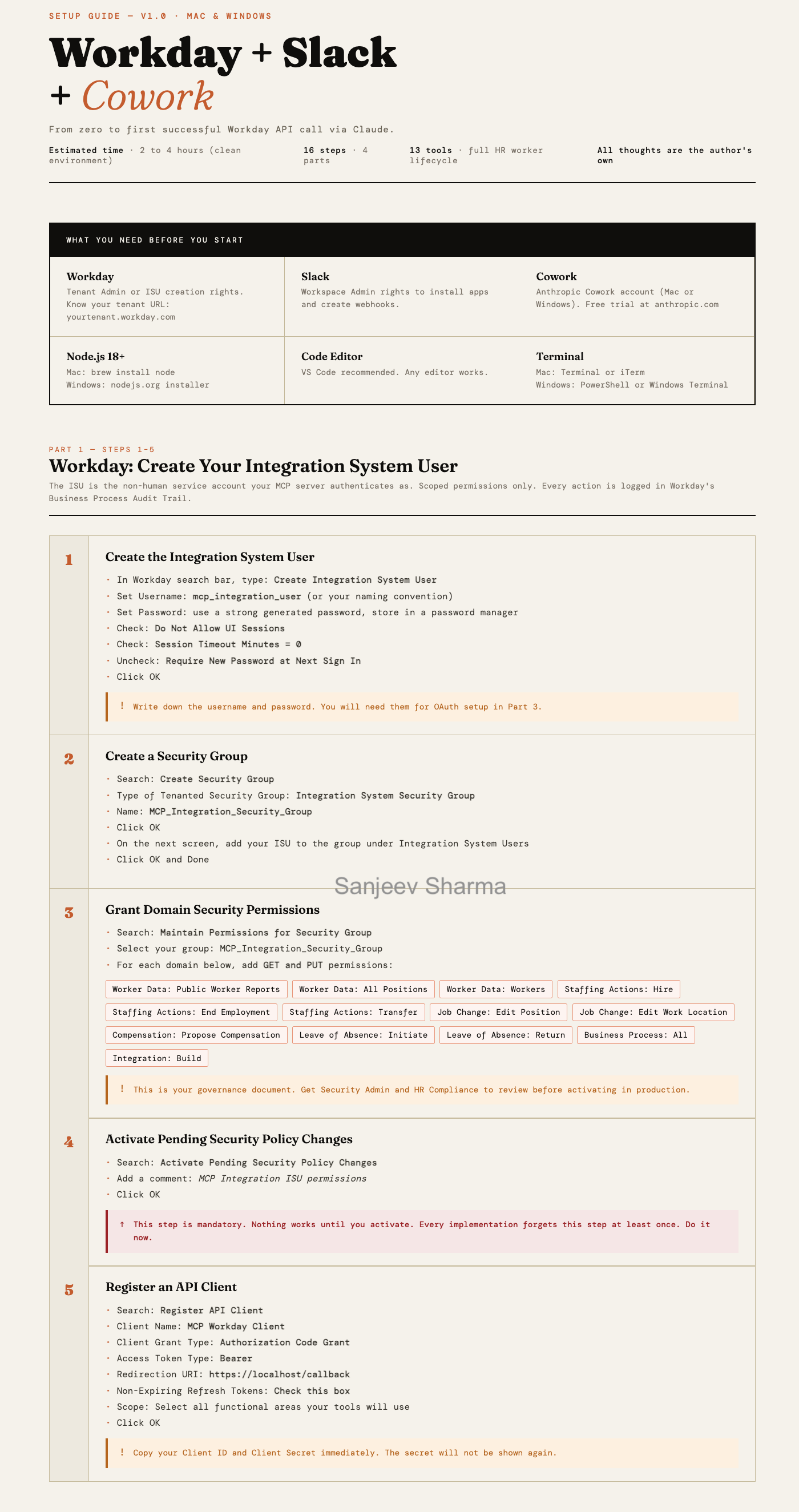
This is the part most people skip past too quickly and then spend two hours debugging. The ISU is not just a service account. It is your governance artifact. Every action the MCP server takes runs under this identity and lands in Workday’s Business Process Audit Trail. That audit trail is what you show your CISO when they ask how you control this thing.
The gotcha that gets everyone: Step 4. Activate Pending Security Policy Changes. Workday does not apply permissions immediately. You can create the perfect security group, assign every domain correctly, and still get a permissions denied error because you forgot to activate. It is the most common setup failure and it happens to experienced Workday admins too. Do it before you touch anything else.
Now the design decision most quickstarts do not mention: one ISU may not be enough at scale. At 60 REST calls per minute and roughly four calls per employee operation, you are processing 12 to 15 employees per minute through a single account. For a small team running occasional HR workflows that is fine. For an enterprise running concurrent workflows across multiple HR use cases simultaneously, that ceiling becomes real fast.
The architectural options worth considering before you go to production: multiple ISUs scoped to different functional areas. One for staffing actions, one for compensation, one for location and job changes. Each gets its own rate limit headroom. Workday supports this and it also gives you a cleaner audit trail by function. The tradeoff is more accounts to manage, more security group configurations to maintain, and more governance surface to review. Whether that complexity is worth it depends on your expected transaction volume and how many concurrent workflows you anticipate running. A good Workday architect will want to size this before committing to a single account design.
One thing worth knowing before you go into production: the domain permission table is your minimum viable governance document. Before you run this against a live tenant, that table needs a sign-off from your Workday Security Admin, HR Compliance, and ideally your CISO. Not because it is dangerous in a sandbox. Because the conversation you have getting those sign-offs is what builds the organizational trust that lets you actually deploy this thing.
Part 2 — MCP Server: Install and Configure
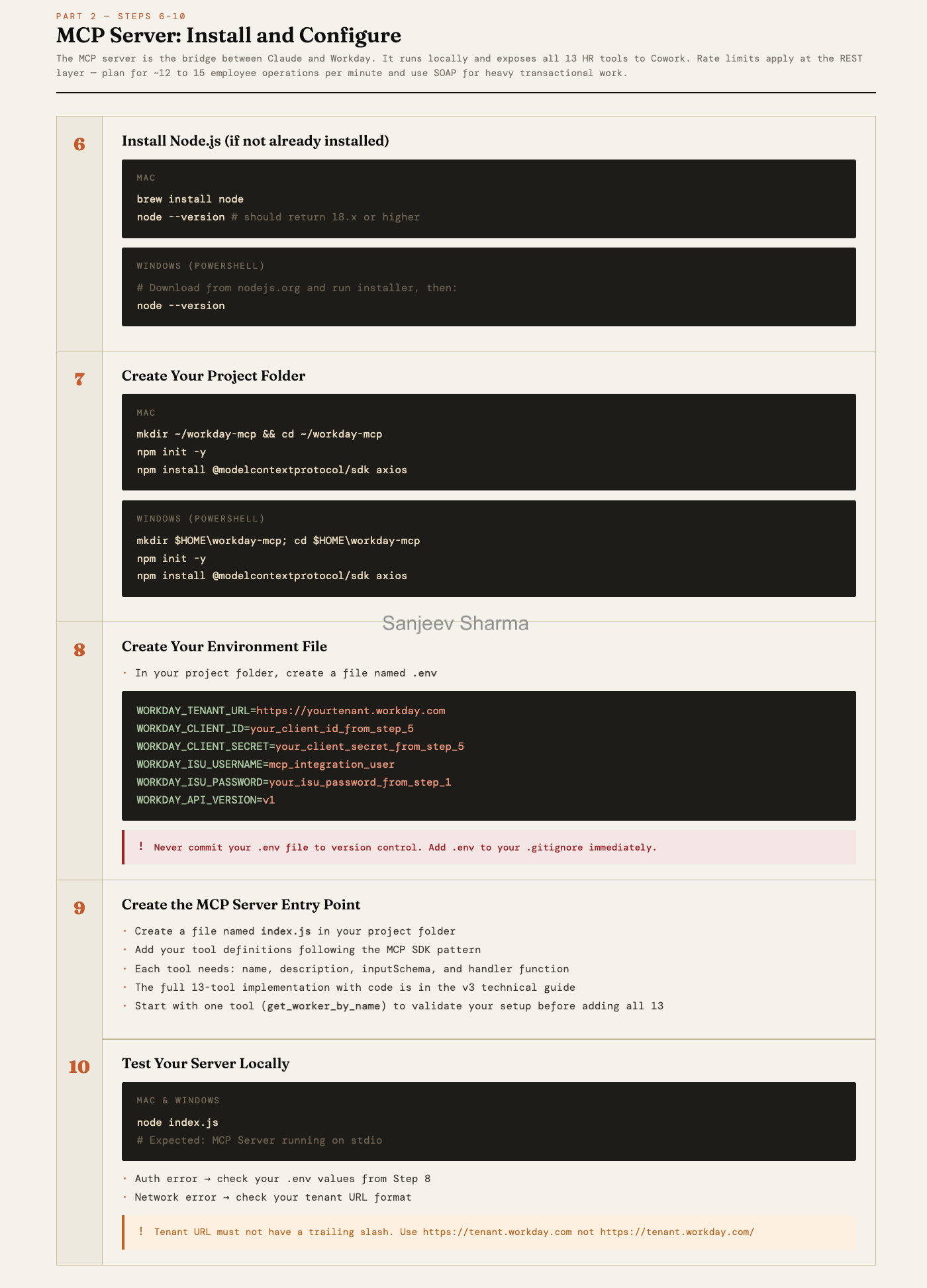
This is the engineering heart of the build. The MCP server sits between Claude and Workday and it is where the real design decisions live. Cowork gives Claude something to talk to. The MCP server is what Claude is actually talking to.
The thing to understand about API limits before you get too far: as mentioned in part 1, Workday’s REST API runs at roughly 60 calls per minute. That sounds like a lot until you realize each employee operation is not one call. It is four. Name resolution to a Worker ID, reference data lookup, business process initiation, inbox task handling.
There are three credible paths depending on what your team knows and what your environment supports.
The first is SOAP. For the heavy transactional operations, compensation changes, transfers, terminations, new hires, Workday built SOAP to handle enterprise integration workloads at volume. It does not carry the same rate limit constraints as REST and it is what EIB runs on under the hood. The tradeoff is complexity. SOAP requires XML envelope construction, tenant-specific debugging, and a Workday integration engineer who knows what they are doing. For a good architect it is the right call for production. For a weekend sandbox it is where things get gnarly fast.
The second is RaaS. Workday’s Report-as-a-Service lets you run custom reports via API and pull structured data back without burning REST call budget on individual lookups. If your workflow is read-heavy, pulling workforce data to feed into Claude’s reasoning before executing any writes, RaaS is worth knowing about. It is underutilized in most MCP designs and it can significantly reduce your REST call volume on the lookup side of the equation.
The third is batch architecture. Instead of processing employee operations in real time, you queue them in the MCP server and process them in controlled batches on a schedule. Standard Node.js async work with a job queue, retry logic, and exponential backoff on rate limit hits. Less real-time but more predictable at scale, and it gives you a natural place to build in error handling and reporting per employee rather than failing an entire workflow if one name resolution goes wrong.
A smart implementation probably combines all three. REST with WID caching for lookups. RaaS for bulk data pulls. SOAP for transactional execution. Batch queue for volume operations. None of that is exotic. It is standard enterprise integration engineering. But it is a design conversation worth having before you commit to an architecture, not after you hit the rate limit ceiling in production.
Start with one tool. Get get_worker_by_name working cleanly before you add the other twelve. The pattern is identical across all 13 tools. Validate the auth, the tenant URL, and the WID resolution on a single tool and the rest follows.
Part 3 — Cowork: Connect Your MCP Server
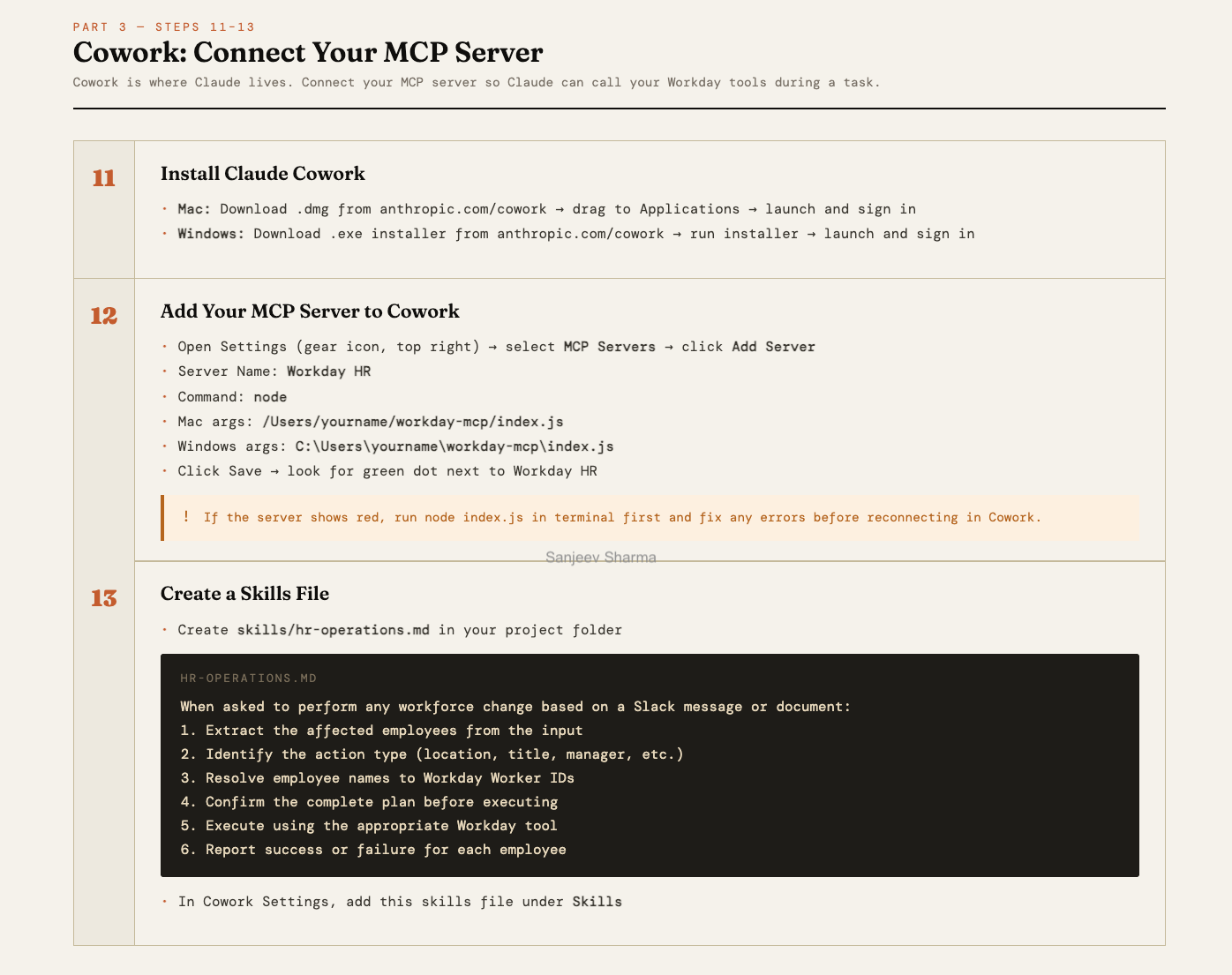
This part looks simple and mostly is. Cowork’s job in this stack is to be the orchestration layer, not the workhorse. It handles natural language intent, the confirmation gate before any Workday action executes, and the human-in-the-loop moment that keeps this from being fully autonomous. That last part is a feature, not a limitation.
The skills file is easy to underestimate. It is not just configuration. It is the behavioral contract that tells Claude how to handle HR operation requests. The six-step sequence in that file encodes the governance logic: extract, identify, resolve, confirm, execute, report. If you want Claude to behave differently, for example requiring a second confirmation for actions above a certain employee count, that is where you put it.
One thing a sharp engineer pointed out after reading the guide: a well-implemented server should pass the requester’s name from Slack into the Workday Reason field. That closes the chain of custody loop before your CISO asks for it. Every action in the audit trail then shows not just what happened and when, but who asked for it. That is not a nice-to-have in an enterprise deployment. That is the answer to the question that gets asked when something goes wrong.
One practical gotcha: if Cowork shows the server as red, do not debug inside Cowork. Open a terminal, run node index.js directly, and fix what you see there. The error will be clearer in the terminal than anywhere else.
Part 4 — Slack: Connect the Channel Trigger
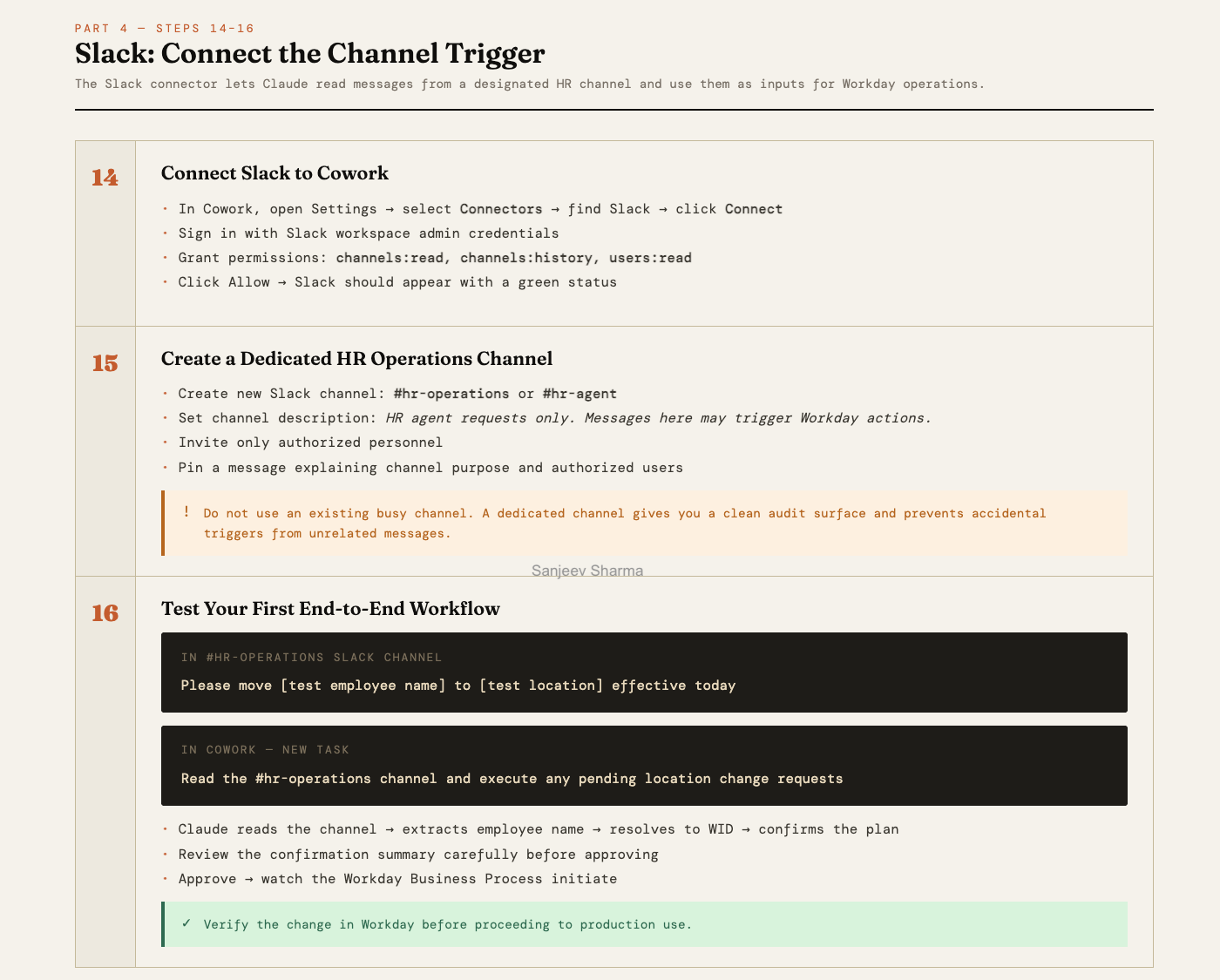
The Slack connector is where the workflow becomes something a non-technical HR operator can actually use. A message in a channel becomes a Workday action. No form, no ticket, no system login required. That is the value proposition in one sentence.
The dedicated channel requirement is not optional hygiene. It is the audit surface. Every request that comes through that channel is a clean, timestamped record of who asked for what and when. If you route this through an existing busy channel you lose that. You also introduce the risk of accidental triggers from unrelated messages. Give it its own channel, pin the usage instructions, restrict who can post.
The big unsolved problem in this part is the trigger gap. Right now Cowork does not poll Slack automatically. A human still has to go into Cowork and kick off the task. For a production deployment that matters. The workaround is a Zapier webhook. Or the cleaner solution is an event-driven architecture that listens for new messages in the channel and fires the Cowork task automatically. That is not a weekend build but it is the next logical step if you want this running without someone remembering to check.
The end-to-end test in Step 16 is not just a validation step. It is the moment you see the confirmation gate work in practice. Read what Claude surfaces before you approve it. That summary is what stands between natural language intent and an irreversible change in your HRIS. It should feel like a checkpoint, because it is.
Part 5 - Repo Structure
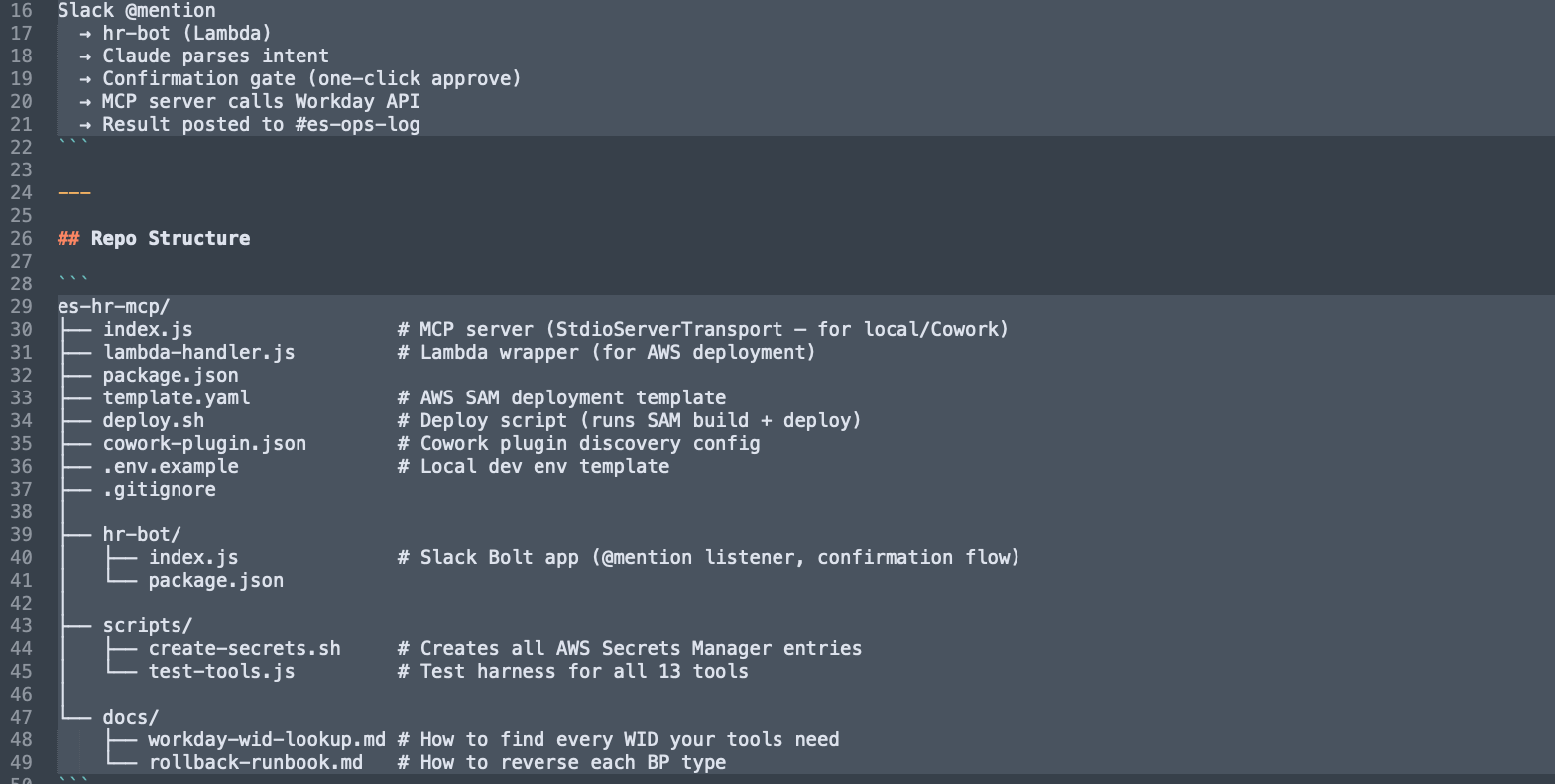
Core MCP Server (es-hr-mcp/)
index.js: The primary MCP server that bridges Claude/Cowork to Workday using a hybrid of REST and SOAP protocols.lambda-handler.js: A wrapper that adapts the MCP server logic to run as an AWS Lambda function for cloud deployment.package.json: Defines the project metadata and essential dependencies like@modelcontextprotocol/sdkandaxios.template.yaml: An AWS SAM (Serverless Application Model) file used to define and deploy your cloud infrastructure.deploy.sh: A shell script that automates thesam buildanddeploycommands for consistent updates.cowork-plugin.json: The discovery configuration file that allows the Anthropic Cowork app to identify and load your tools..env.example: A template providing the required environment variable keys (Tenant URL, Client IDs) without exposing actual credentials..gitignore: Prevents sensitive files, such as your active.envor local logs, from being committed to the repository.
Slack Interface (hr-bot/)
index.js: The Slack Bolt application that listens for @mentions and manages the natural language parsing and approval gate.package.json: Manages the specific dependencies for the Slack bot, such as@slack/boltand the Anthropic SDK.
Utility Scripts (scripts/)
create-secrets.sh: A security script that pushes your local environment variables into AWS Secrets Manager for production use.test-tools.js: A diagnostic harness used to verify that all 13 Workday tools are functioning correctly in isolation.
Documentation (docs/)
workday-wid-lookup.md: A reference guide for finding the unique Workday IDs (WIDs) required for worker and location lookups.rollback-runbook.md: A critical governance document outlining how to manually reverse or correct Business Processes if an error occurs.

The Honest Assessment
A friend of mine, a serious engineer, read through the guide and called this a “classic weekend project that leverages modern orchestration patterns.” His words, not mine. He said the difficulty is not in the code. It is in navigating the Workday maze and handling the brittle nature of enterprise APIs.
He is right. And his timeline matched what actually happened. Friday night standing up the ISU and security groups. Saturday morning scaffolding the MCP server. Saturday afternoon in the SOAP struggle, his words again, six hours of XML field mapping and tenant-specific debugging. Sunday testing the end-to-end workflow and cleaning up the skills file.
His conclusion was the same as mine. Functional prototype by Sunday night. Not production-ready for 10,000 employees. A working sandbox blueprint that a technical team can take and run.
That framing matters. This is not a deploy-and-forget solution. It is a starting point that a competent team can take from sandbox to production with the right Workday integration expertise, a proper governance review, and a clear architectural decision on the rate limit question. None of that is insurmountable. All of it requires intentional engineering.
The implementation is solvable. The harder question is what you do with it.
A note before you go
I built this because I wanted to understand what was actually possible. There are lots of thinly accurate posts masked as reality floating around, and I needed to be sure as someone who wants to build the future. There is a difference and it matters.
If you are an architect evaluating whether to build something like this, I hope this saved you a weekend. If you are an engineer who wants to go deeper, the full technical reference with all 13 tools, the complete ISU permission table, SOAP envelope construction, and three paths to autonomous triggering is available, I just won’t be published it out, yet.
And if you are somewhere in the middle, curious but not sure where to start, or you have a team that is ready to move and wants someone who has already made the mistakes, reach out. I am not selling a course. I do not have a 12 week program. I have a working build, a documented architecture, and a real interest in helping teams get this right the first time. I’m just trying to advance the bubble of reality.
Find me here or on LinkedIn.